Legal AI on Microsoft, one practice in one week.
Microsoft Copilot now brings legal skills into Word and Cowork, inside the tenant a legal team already governs. The Spaarke Accelerator lets a team start quickly, with best practice already configured: core legal skills, practice packs, calculation tools, and forward-deployed legal engineers.
Microsoft is now the platform for legal AI.
Legal teams have proven where AI fits in their work and are ready for the next step. The early tools sit outside the core legal systems and are governed by their vendors, not by the organization. Standard Copilot is a capable generalist, and legal work needs a specialist. Copilot for Legal provides one, inside the environment most legal teams already run.
- The legal skills
- More than 20 legal skills are generally available. In Word, a lawyer reviews a contract against the team's playbook. In Cowork, the Legal plugin reviews, summarizes, drafts, and redlines across many files, including a set of invoices.
- Tuned to the team
- Plugins package skills, tools, and MCP connectors to other systems. Playbooks capture the team's positions in Word documents the skills apply. Administrators govern all of it through a plugin registry.
- The tenant
- Copilot works inside the Microsoft 365 service boundary and shows each user only what that user may already see. Entra ID, sensitivity labels, and retention in Microsoft Purview apply to legal AI as they apply to everything else, and the organization chooses among models from Anthropic, OpenAI, and Microsoft.
Legal AI on Microsoft is built in layers, from enterprise governance to legal skills.
Each layer inherits what the layers below it provide. Microsoft supplies the governance and the services at the base, a legal platform of systems of record and a decision support ontology sits in the middle, and legal skills run on top.
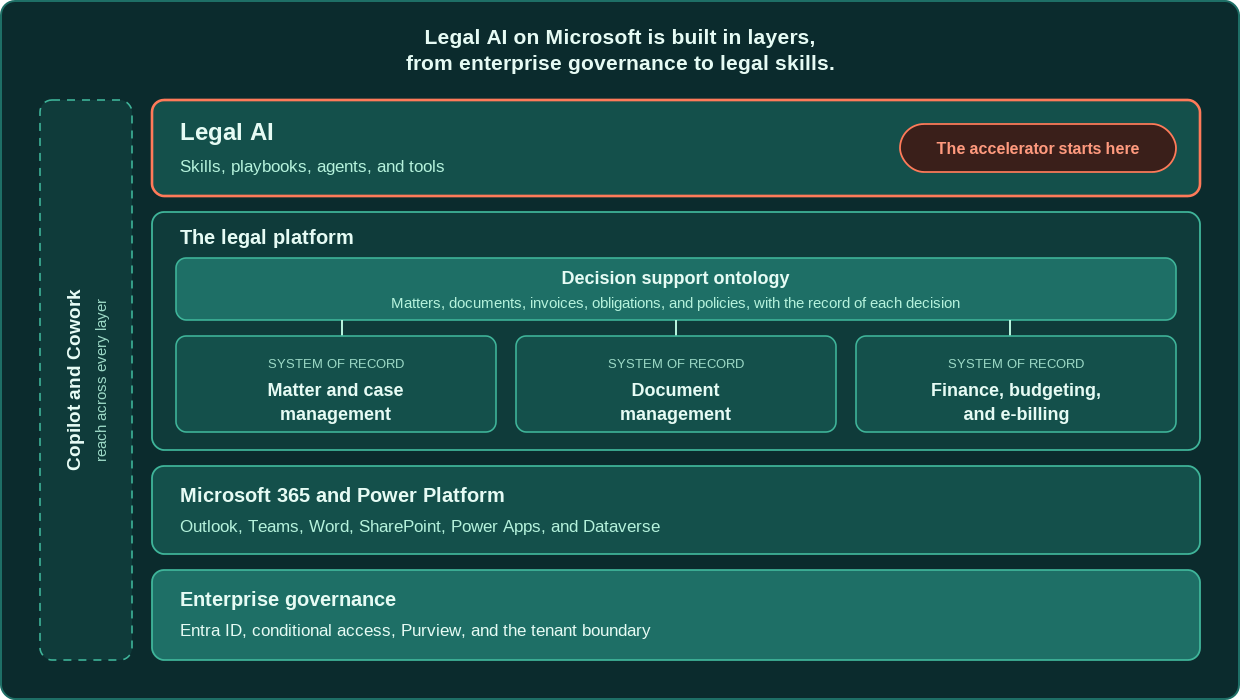
Because Microsoft is enterprise software, the organization can extend any layer with its own applications and integrations. The accelerator starts at the top layer, and the platform layers follow.
Spaarke maintains two layers of legal content, and your team owns the third.
- The foundation
- Core legal skills that every practice uses: reviewing a document against a playbook, preparing an issues list, extracting key terms, comparing documents, building a chronology, writing a matter brief, and checking citations.
- Practice packs
- Specialty skills, playbook templates, checklists, and calculation tools for practices such as NDAs, commercial real estate, M&A, employment, litigation, patents, and trademarks, and an invoice review pack for legal operations.
- The team's own playbooks
- Your preferred and fallback positions, escalation rules, house style, and approved precedents, captured in files the team owns. Updates to the foundation and the packs never overwrite them.
Most of the effort in a deployment goes into the third layer, because that is where the team's own expertise enters its legal AI. Some work also has to come out the same way every time. A notice deadline, a rent escalation, a patent term, or the arithmetic on an invoice is computed by a calculation tool, and the AI calls the tool when the work needs one.
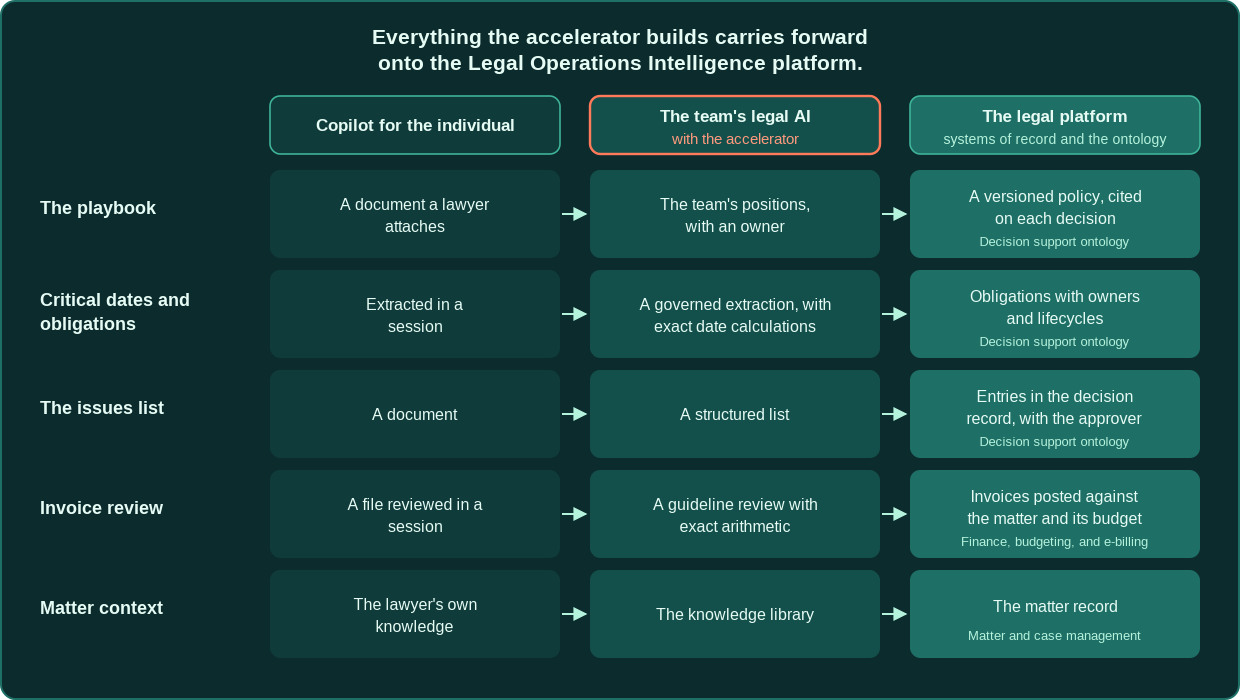
Because the playbooks are the team's own files in its own tenant, they stay with the team and carry forward to everything it builds next, including the Legal Operations Intelligence platform.
The accelerator delivers nine components into your own tenant.
- Legal skills
- Foundation and practice pack skills in the Agent Skills format, deployed as plugins to Cowork and Copilot Chat.
- Playbooks for Word
- Playbooks rendered as Word documents from the team's own positions, for Word's legal drafting and review skills.
- Knowledge library
- A SharePoint site structure for precedents, the clause library, and checklists, in your own tenant.
- Agents
- Copilot agents for each practice, grounded on the knowledge library and shared with the team.
- Tools and MCP connectors
- Calculation tools for the work that must be exact, and connectors to the systems you already license.
- Setup interview
- A guided skill that walks a practice lead through positions, fallbacks, escalation, and house style.
- Evaluation set
- Questions and documents for each practice, extended with your own, to test results on your work.
- Governance and deployment
- Human review guidance in every skill, a summary for IT of how data flows, and an administrator deployment package.
- Adoption
- Installation guides, training prompts, and a usage baseline from which to measure results.
A team can deploy the packs itself. With Spaarke's legal engineers, the first practice is live in one week.
The engagement covers one practice in one week.
Spaarke's forward-deployed legal engineers are attorneys, legal operations professionals, and specialty practitioners who work inside the team's own operations.
- 01
Choose the tasks and record the baseline
The team chooses two or three recurring tasks in one practice and records how long they take today.
- 02
Write the playbooks
The legal engineers and the practice lead capture the team's positions with the setup interview and curate its knowledge library.
- 03
Configure and connect
The legal engineers configure the skills, agents, and tools, and connect the systems the practice relies on.
- 04
Test on the team's own documents
The team tests the results on its own documents against the baseline.
- 05
Train and hand over
The legal engineers train the team and hand over the deployment, with an administrator package for IT.
At the end of the week, the team has:
- The team's own playbooks, written with the setup interview and held in its own files.
- The practice pack and agent deployed in your own tenant.
- Results measured on your own documents against today's baseline.
- A deployment package your IT team has reviewed.
- A plan for the next practice.
Everything the accelerator builds carries forward onto the Legal Operations Intelligence platform.
Book a 30-minute scoping session
In 30 minutes we choose the practice and the first tasks, confirm the Microsoft setup with your IT lead, and plan the week.